
murmur

Making music
should feel like playing.

A playful workspace for sketching ideas, shaping songs, writing lyrics and seeing where the music takes you.

A Mac app, made in Austria. Beta later this year.

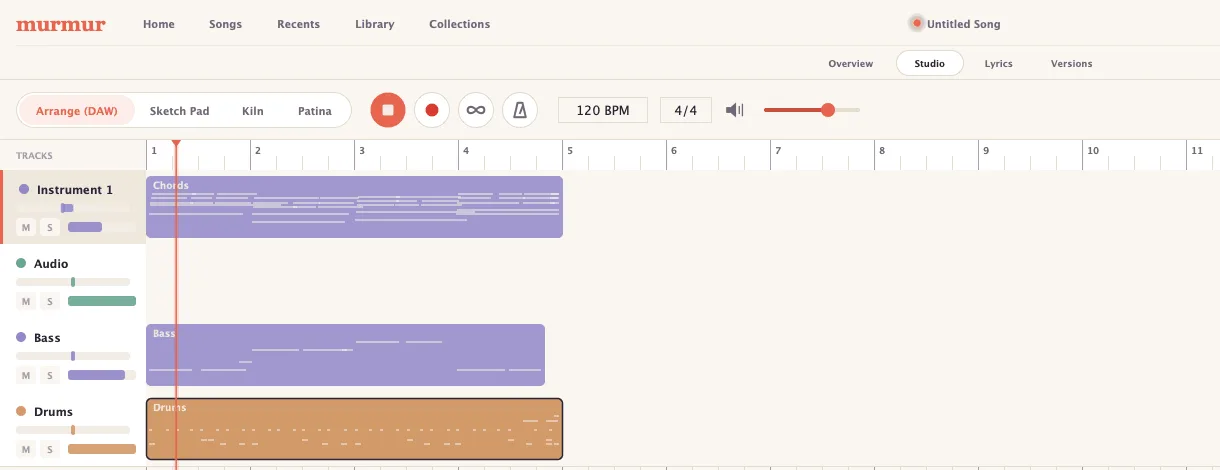
The Murmur arrange view: Chords, Bass and Drums clips laid out on a timeline, with the transport, tempo of 120 BPM and a 4/4 time signature across the top.

The Murmur workflow

From a spark to a song.

A song rarely turns up in a straight line. You sketch something, arrange it, write a verse, mess with a sound, change your mind. In Murmur all of that is one room, and nothing you try gets left behind in it.

Sketch Pad

Sketch what the music should do.

Long before you know what a song should play, you know what it should do. Say that first, hear it, and keep going.

What comes back is real music on real tracks, yours to change.

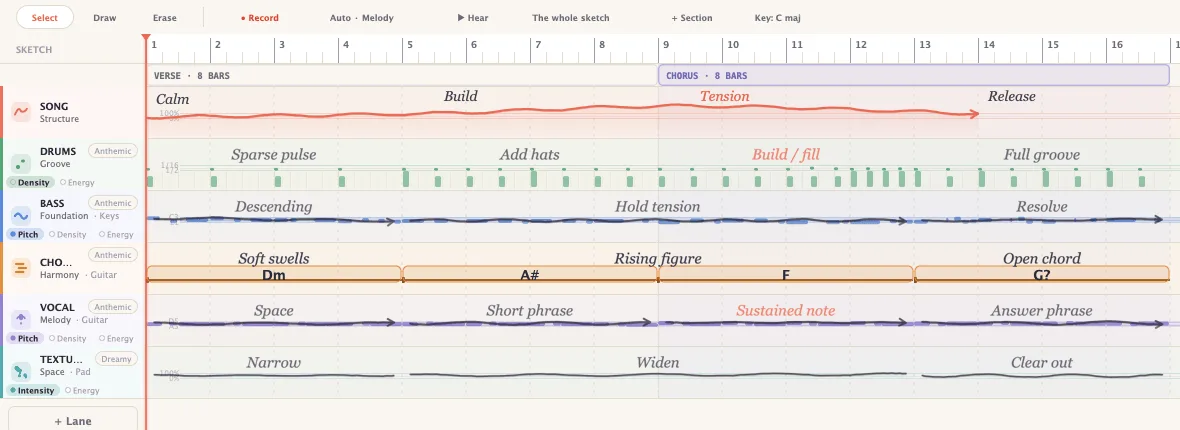
  • Draw the shape: build here, fall away there, sparse, busier, rising, descending.
  • Hum a line or tap a rhythm and hear it come back as notes you can nudge.
  • Chords as chords with the Roman numerals shown quietly, if you want them.
The Sketch Pad canvas: lanes named Song, Drums, Bass, Chords, Vocal and Texture, each with a hand-drawn line and words like Calm, Build, Tension, Release, above chord blocks reading Dm, A♯, F, G.
Three suggested directions for the same sketch  As sketched, Fuller and Held back  each listing the harmony and rhythm it will play, with Preview and Commit to Arrange buttons.

Arrange

Turn the idea into the song.

This is where the idea grows edges. Tracks, clips, sections, takes enough studio to get a demo made, and small enough that you can still see the song.

  • Clips on tracks: drag them, trim them, split them, stack them up.
  • Sing into a mic, play a keyboard, or tap out a beat on the drum grid.
  • Choose the sounds, put the effects where you want them, bounce it and send it to someone.
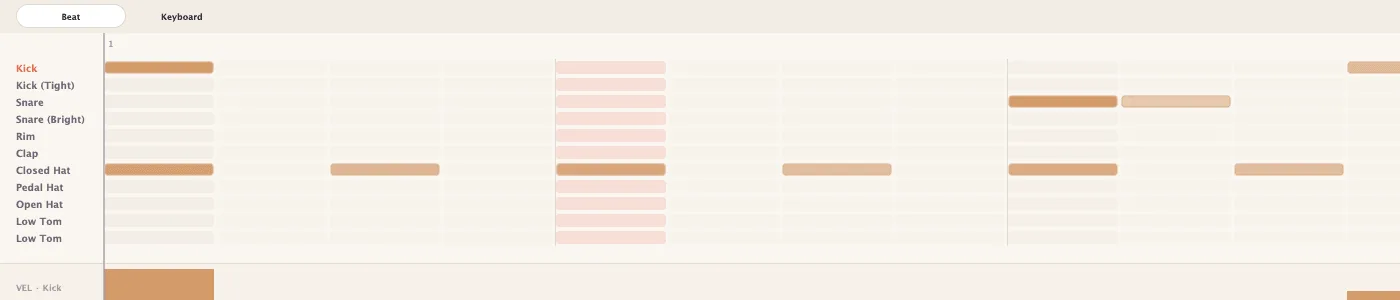
Murmur's drum grid, with rows for Kick, Kick (Tight), Snare, Snare (Bright), Rim, Clap, Closed Hat, Pedal Hat, Open Hat and two toms, and a velocity lane beneath.

Lyrics

Write the words where the music happens.

The words live in the song, not in another notes app you'll forget to open.

Which mostly means: you can hear the part you're writing to while you write it.

  • Lines sit on the bars they’re sung on, in the section they belong to.
  • Loop four bars and keep typing. The music doesn’t stop for the writing.
  • Syllables and rhymes counted quietly, for when a line won’t sit.
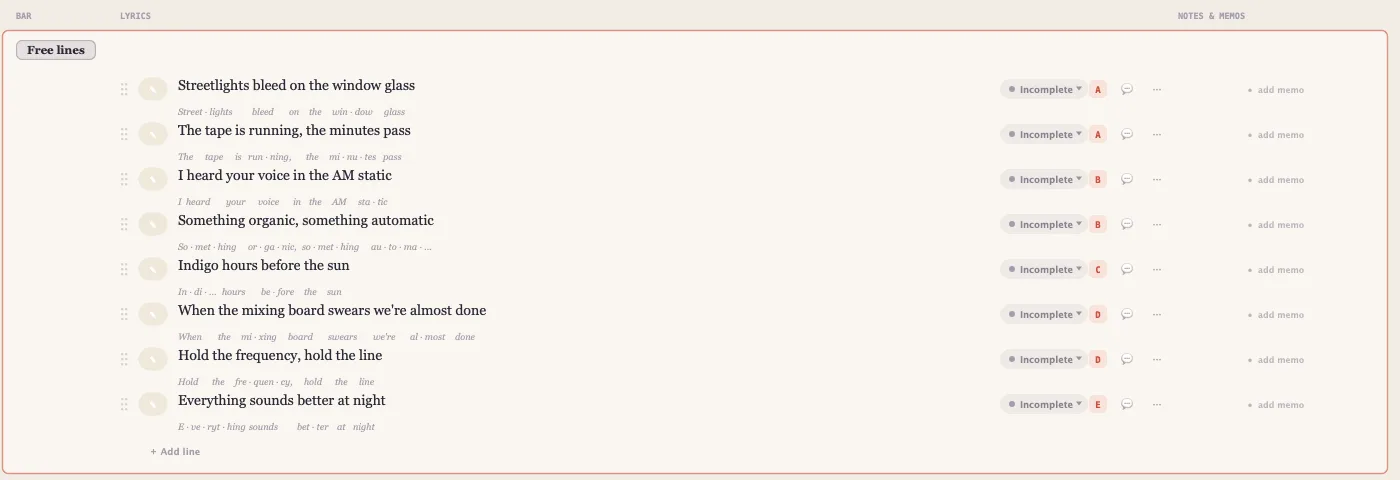
Lyric lines in Murmur  'Streetlights bleed on the window glass', 'The tape is running, the minutes pass'  each broken into syllables underneath, with a status and a rhyme letter on the right.

Versions

Try another direction without losing this one.

Songwriting is changing your mind. Most tools make that expensive: you save a copy, call it final_2_REAL, and a week later you can't find the good bridge.

Here, every direction keeps its name and stays one click away.

  • Versions have names “darker mix”, “late night idea” not numbers.
  • Murmur tells you what changed in words: a section moved, this part is thinner.
  • Found something good in the old one? Bring just that part across.
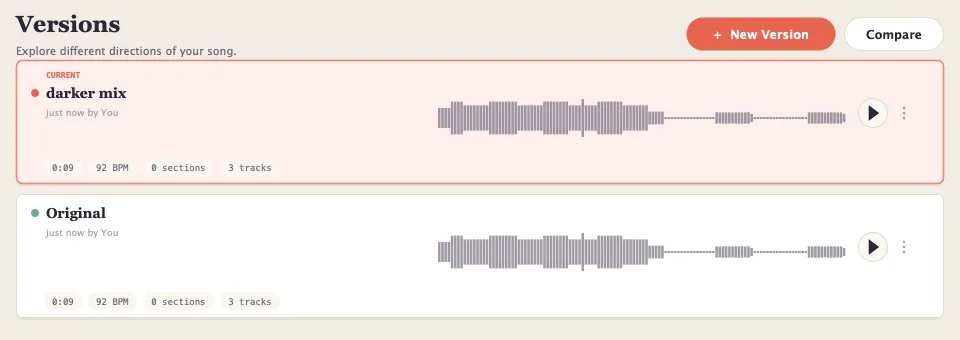
Two versions of a song side by side  'darker mix', marked current, and 'Original'  each with its waveform, length, tempo and track count.

Sound design

Two ways to make a sound yours.

Presets are somebody else's taste. These two start with something of yours.

Kiln

Record a sound. Turn it into something playable.

A hum, a tapped table, a guitar, the room you're sitting in. Kiln listens to it and hands you back an instrument, in tune, across the whole keyboard.

  • Six ways in: Soft Pad, Glassy Keys, Fuzzy Bass, Dream Pluck, Found Kit, Grain Field.
  • Texture, brightness, body, grit, movement, width and a weirdness dial.
  • Keep it in your library, or send it straight to a track.
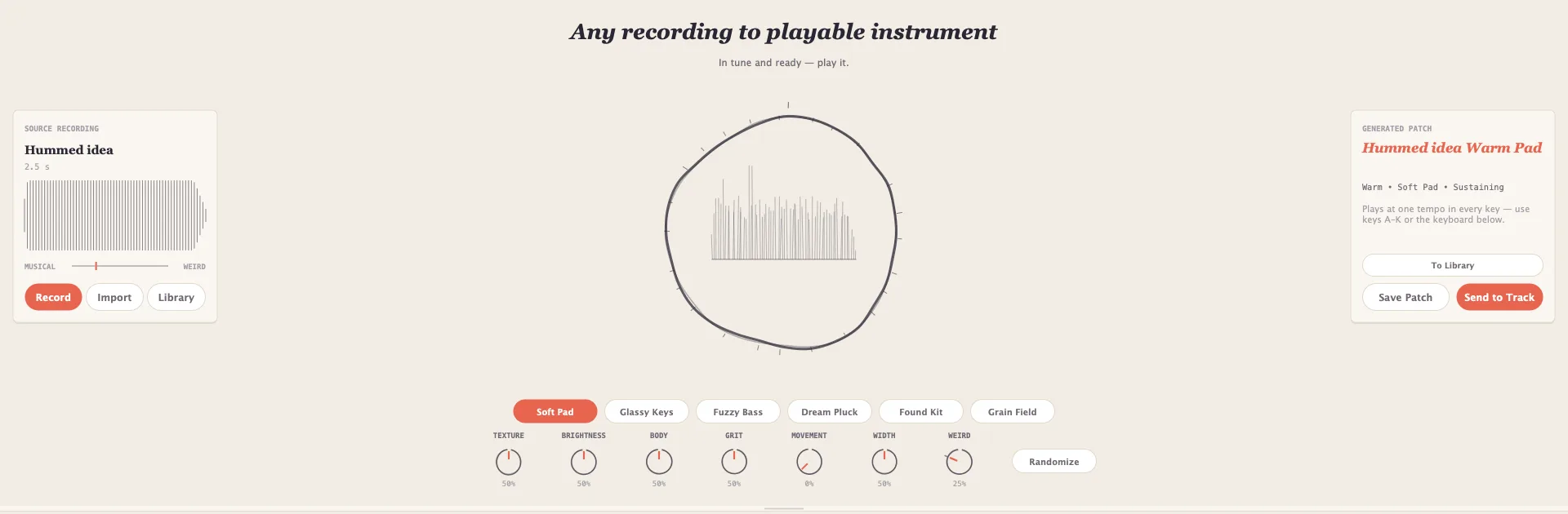
Kiln in Murmur: a source recording called 'Hummed idea' on the left, a drawn waveform ring in the middle, the generated patch 'Hummed idea Warm Pad' on the right, and style chips for Soft Pad, Glassy Keys, Fuzzy Bass, Dream Pluck, Found Kit and Grain Field.

Patina

Give a sound some character.

Everything clean sounds the same. Patina puts some wear on it tape, a room, a wobble in the pitch and you hear it inside the song, not in a vacuum.

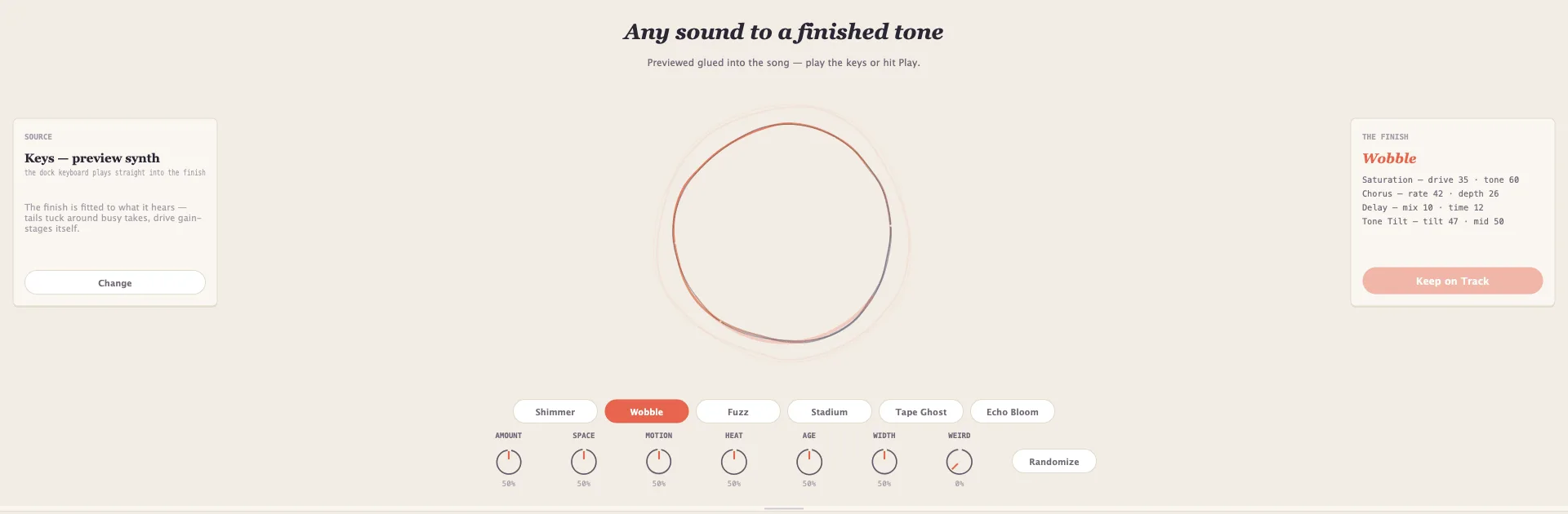
  • Characters: Shimmer, Wobble, Fuzz, Stadium, Tape Ghost, Echo Bloom.
  • Amount, space, motion, heat, age, width and the weirdness dial again.
  • Keep it, and it lands on the track as effects you can still open up.
Patina in Murmur: a source card reading 'Keys  preview synth', a drawn ring in the centre, the finish 'Wobble' listing its saturation, chorus, delay and tone-tilt stages, and chips for Shimmer, Wobble, Fuzz, Stadium, Tape Ghost and Echo Bloom.

Collections

See the bigger thing you're making.

An album isn't twelve unrelated files. It has an order, a mood, and a set of arguments you had with yourself at two in the morning.

Collections give all of that somewhere to live.

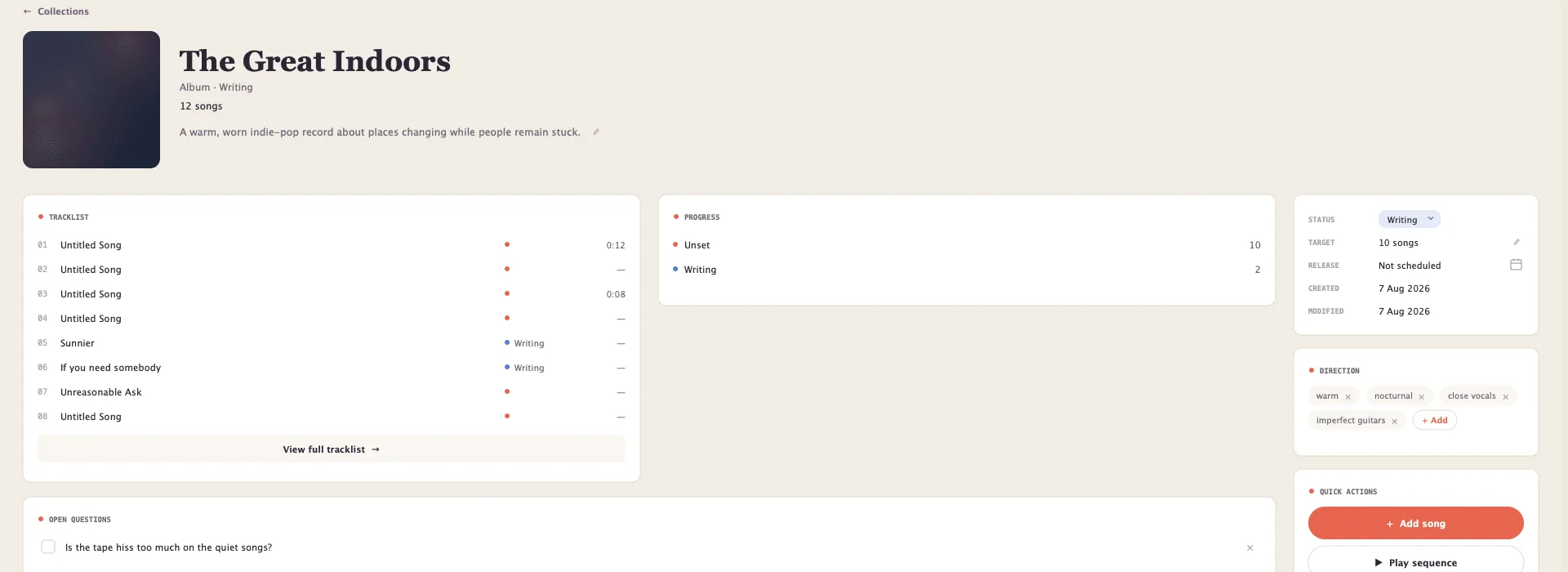
  • Drag the running order around until it flows.
  • Keep the notes, the decisions and the questions you haven’t answered yet.
  • Songs stay where they are a collection points at them.
A collection called The Great Indoors: a numbered tracklist, a progress panel, open questions, recorded decisions, and a direction panel tagged warm, nocturnal, close vocals and imperfect guitars.

Playful by design.
Serious about songs.

Music software has spent thirty years getting more capable and less inviting. Murmur asks for an idea first, and everything else later.

It's a Mac app that works with no account and no connection. Your songs are files on your own disk one per song, with the audio, the words and every version tucked inside.

  • Nothing leaves your machine

    No account, no upload, no sync you didn't ask for. Open it on a plane.

  • Ideas stay editable

    Everything you hear back is real notes on a real track. Change any of it.

  • Musician words

    Bars, beats, sections and feelings. Not parameter names.

  • Sounds ready on first open

    Pianos, keys, basses, guitars, kits, strings, pads, plucks, organs, synths and textures plus your own VST3 and Audio Unit plug-ins.

Ready to make something?

Murmur goes into beta later this year. Leave your address and you’ll be among the first to play with it.